
The jobs list
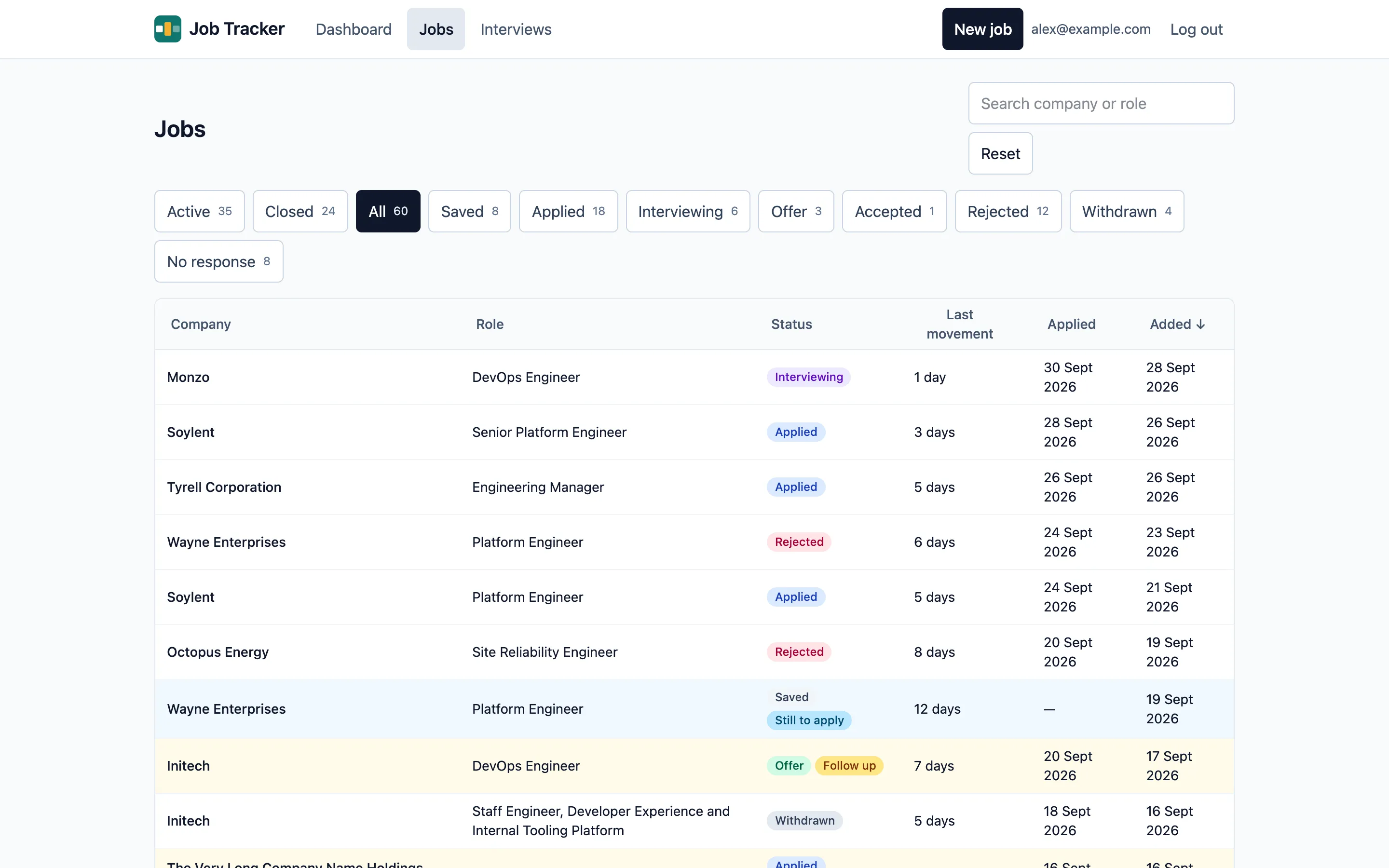
Jobs lists every job you’ve added. On a computer it’s a table; on a phone, a list of cards.
Filters
Section titled “Filters”The buttons above the list filter by status, each with its count:
- Active: saved, applied, interviewing and offer. This is the default.
- Closed: rejected, withdrawn and no response: jobs that ended without an offer being taken.
- All, and then each status on its own.
On a phone, the filters are a Status dropdown instead.
Searching
Section titled “Searching”Type in the search box to find jobs by company or role. It searches as you type, after a short pause, and needs at least 2 characters.
Sorting and paging
Section titled “Sorting and paging”Select a column heading to sort by it, and select it again to reverse the order. Jobs without an applied date always sort last. The default is newest first.
Choose 25, 50 or 100 jobs per page at the bottom of the list.
Jobs that need attention
Section titled “Jobs that need attention”Jobs in one of the dashboard’s lists are highlighted, with a label saying why: Follow up, Still to apply or No response?.
Your view is remembered
Section titled “Your view is remembered”The filter, search, sort and page size you choose are kept in the page’s address, so you can bookmark or share a view, and also remembered by your browser: going back to Jobs later shows the same view. Reset returns to the default.